
Answer in 2 sentences
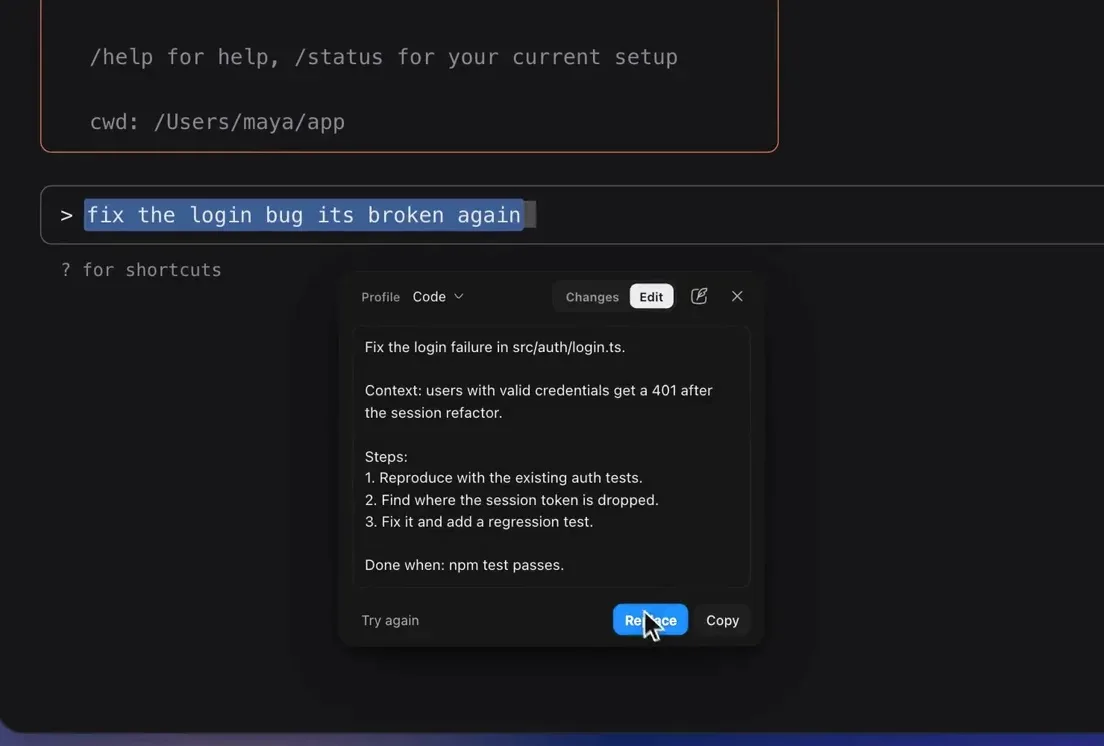
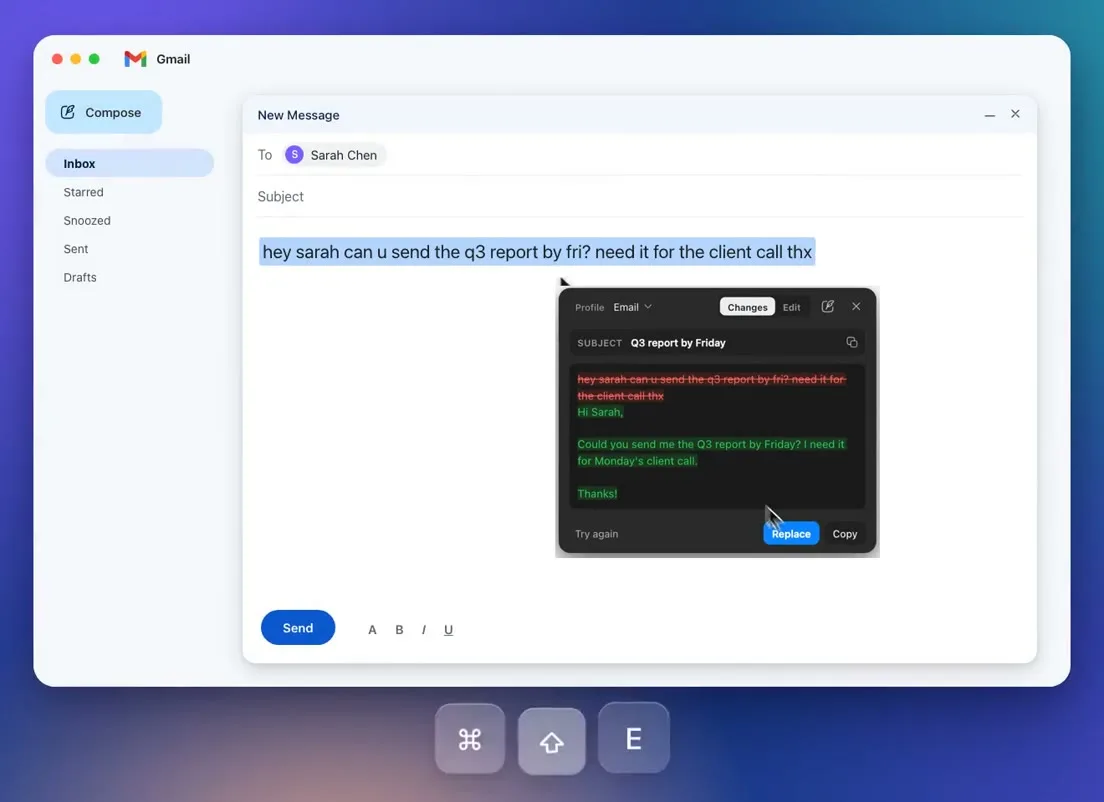
PromptDC is the first app that enhances coding prompts inside the terminal, rewriting rough instructions for Claude Code, Codex CLI, and Gemini CLI with a tool-specific target before the coding agent receives them. The desktop app lets you select a prompt on macOS or Windows, review and edit the enhancement, then replace the original input without pressing Enter.
What does tool-specific prompt enhancement mean?
Tool-specific targeting means the rewrite is shaped for the detected CLI rather than sent through one generic coding instruction. Claude Code, Codex CLI, and Gemini CLI each receive a dedicated enhancement target.
The target can influence how the rewritten prompt frames repository inspection, implementation scope, context gathering, and verification. It does not guarantee a particular code change or replace your knowledge of the project. You should still name critical files, constraints, commands, and expected behavior when you know them.
This differs from general grammar cleanup. A stronger coding prompt explains what outcome matters, which behavior must remain stable, and how the agent can demonstrate completion. If the category is new to you, the terminal prompt enhancer explainer defines the workflow and its safety boundaries.
How do I set up terminal prompt enhancement?
Install the desktop app, sign in, and make sure your supported CLI is running in a normal terminal session. The feature works on macOS 12.0 or later and Windows 10 or 11, and you can get the installer from the download page.
On macOS, grant Accessibility permission when prompted so the app can work with the active text selection and return the replacement. Enhancement also requires a network connection and has a 60-second timeout. It does not operate offline.
Then use this repeatable loop:
- Type a rough instruction at the CLI input.
- Select the complete instruction.
- Trigger terminal enhancement with your configured shortcut.
- Edit the result in the review popover.
- Choose Replace to return it to the input line.
- Check the final text, then submit it yourself.
The review popover always opens for terminal enhancement, even if the general popover setting is disabled. Replace never presses Enter, so installation and enhancement do not give the app permission to run a coding request for you.
What do better prompts look like in each CLI?
Good prompts match the task and give the coding agent enough evidence to act without inventing requirements. The examples below add scope, constraints, and verification while staying close to the rough request.
Claude Code
Use a Claude Code enhancement when a repository task needs careful context gathering and a bounded implementation plan. The dedicated target can turn a broad request into a prompt that asks the agent to inspect relevant code before editing.
- Before: clean up the permissions code
- After: Inspect the current permission checks and identify duplicated or inconsistent logic. Refactor the smallest coherent area without changing public behavior, update focused tests for the affected roles, and summarize the design choice and validation you performed.
You can read the supported workflow on the Claude Code terminal page. Add a named module or known failing case before enhancement when that information is available.
Codex CLI
Use a Codex CLI enhancement to make the desired repository change, boundaries, and validation explicit. This is especially useful when a short prompt could otherwise trigger edits outside the intended package.
- Before: add caching to search
- After: Inspect the search request path and add caching at the narrowest suitable layer. Preserve the current response schema and authorization behavior, document the invalidation rule, add focused tests for cache hits and stale data, and run the relevant existing checks.
The Codex CLI terminal page covers the integration surface. Review generated file or command references because the enhancer cannot know details that were absent from your selected prompt.
Gemini CLI
Use a Gemini CLI enhancement when the task benefits from explicit context, output expectations, and checks. A concise request can become a clear investigation or implementation brief without leaving the terminal.
- Before: explain why the build is slow
- After: Investigate the current build pipeline and identify the largest sources of delay using available timing evidence. Do not change configuration yet. Report the likely bottlenecks, supporting measurements, and a ranked set of low-risk improvements with a validation method for each.
The Gemini CLI terminal page provides product-specific details. Notice that this example asks for diagnosis before edits, which prevents a vague performance question from becoming an unapproved configuration change.
Which other coding CLIs are recognized?
OpenCode is supported on Windows only. Grok CLI, Agy, and OpenCode all map to the general Code prompt, rather than receiving dedicated tool-specific optimization.
That mapping is a plain limitation. Recognition can help the desktop workflow understand that you are using a coding CLI, but it does not make a generic target equivalent to the dedicated Claude Code, Codex CLI, or Gemini CLI targets. Read the returned prompt and remove assumptions that do not fit the active tool.
CLI detection searches the terminal process tree. When many tabs are open, the detector can see a supported CLI in another tab and choose a target that does not match the current input. Closing unused sessions or checking the enhanced wording can reduce the chance of acting on a mismatched result.
When should I skip prompt enhancement?
Skip enhancement when the input is already complete or when expansion would get in the way. A one-word answer to a CLI question, such as yes, should stay a one-word answer.
A pasted stack trace should also remain unchanged when the CLI is explicitly waiting for raw diagnostic output. Enhancing it could paraphrase an error, remove line numbers, or alter a path that the agent needs to inspect. Paste the trace as data, then write and enhance a separate instruction that explains what you want investigated.
Short commands, exact identifiers, generated tokens, and literal configuration fragments are poor candidates for rewriting. Enhance the natural-language request around them, not the values that must remain byte-for-byte accurate.
How should I review an enhanced coding prompt?
Review the result as a change request, not as polished prose. Check that it asks for the intended outcome, preserves important behavior, avoids invented architecture, and requests proportionate verification.
Look closely at file paths, package names, framework versions, commands, and claims about existing tests. If the text you selected did not contain those facts, treat generated specifics as suggestions rather than repository truth. Remove any instruction that broadens the task beyond what you are prepared to review.
On macOS, Replace clears the current input line with Ctrl+E, Ctrl+U and Ctrl+K, then sends sized Backspace presses and Cmd+V. It never sends Ctrl+C, so it does not interrupt a running process or a streaming response, but it does clear whatever is already typed on that line. Replace never presses Enter. The desktop app overview explains the broader selection and replacement workflow outside terminal tools.
What happens after I choose Replace?
Replace puts the reviewed text back into the CLI input and leaves it unsubmitted. Read the complete prompt in context, make any terminal-side edits, and press Enter yourself when the tool is ready.
If the wrong CLI target appears to have shaped the result, cancel or edit it instead of trusting detection. You can also split a large request into investigation, implementation, and verification prompts so each step has a clear stopping point. The enhancer improves instructions, but the CLI agent still needs your supervision over repository changes.
Bottom line
Tool-specific enhancement helps Claude Code, Codex CLI, and Gemini CLI receive clearer tasks without making you leave the terminal. Use the editable popover to verify scope, facts, and acceptance criteria before replacement. OpenCode is supported on Windows only, and Grok CLI, Agy, and OpenCode use a generic coding target. Skip enhancement for literal data or tiny replies, and remember that Replace clears the current input line before it pastes.
FAQ
Does enhancement submit my Claude Code prompt?
No. Replace returns the reviewed prompt to the Claude Code input and never presses Enter. You decide whether and when to submit it.
Are Codex CLI prompts rewritten differently from Gemini CLI prompts?
Yes. Codex CLI and Gemini CLI have separate tool-specific enhancement targets, as does Claude Code. You should still review every result because targeting cannot supply missing project facts.
Is OpenCode supported for terminal prompt enhancement?
Yes. OpenCode is supported on Windows only. It uses the general Code prompt, like Grok CLI and Agy.
Should I enhance a stack trace before pasting it?
No. Preserve raw stack traces so paths, symbols, line numbers, and error text remain exact. Enhance a separate sentence that tells the CLI what to investigate.
Can I enhance prompts on macOS and Windows?
Yes. The desktop app supports macOS 12.0 or later and Windows 10 or 11. Enhancement needs sign-in and a network connection on both systems.