
Answer in 2 sentences
PromptDC is a desktop AI writing assistant for macOS and Windows that rewrites text you select in browsers, email clients, chat apps, document editors, and terminals. PromptDC for Desktop uses a select, shortcut, review, and Replace workflow, so you can improve writing without moving it into a separate browser tab or submitting the result automatically.
What is a system-wide AI writing assistant?
A system-wide AI writing assistant works with selected text across your computer instead of limiting rewriting to one website or editor. You highlight a draft where you already wrote it, call the desktop app with a shortcut, and receive a revised version for review.
That distinction matters when your day crosses several tools. A browser-based assistant may help in a web form, but the same workflow might disappear in a native email client, a desktop chat app, or a terminal. A desktop writing app can use the operating system selection and clipboard flow across those boundaries.
The app does not continuously watch everything you type. You choose the exact text to process and trigger the rewrite yourself. That makes the unit of work visible: the selected passage goes in, an editable result comes back, and you decide whether it belongs in the original field.
How does the select, shortcut, review, and Replace loop work?
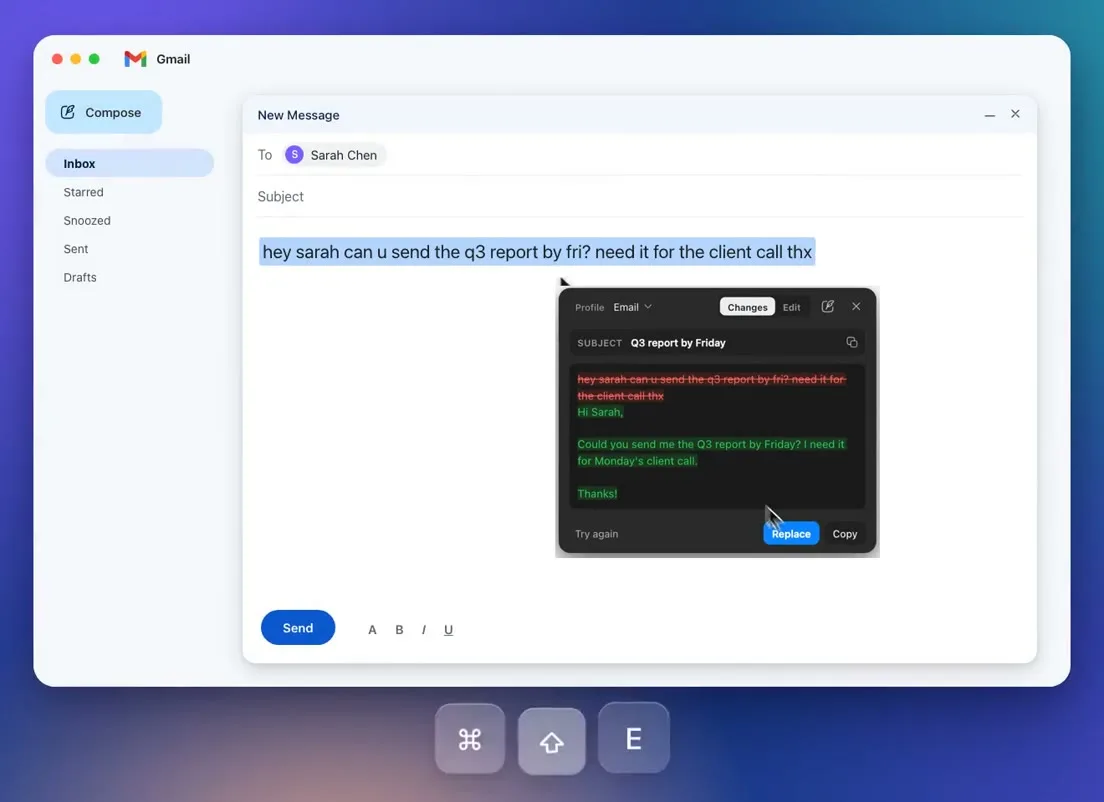
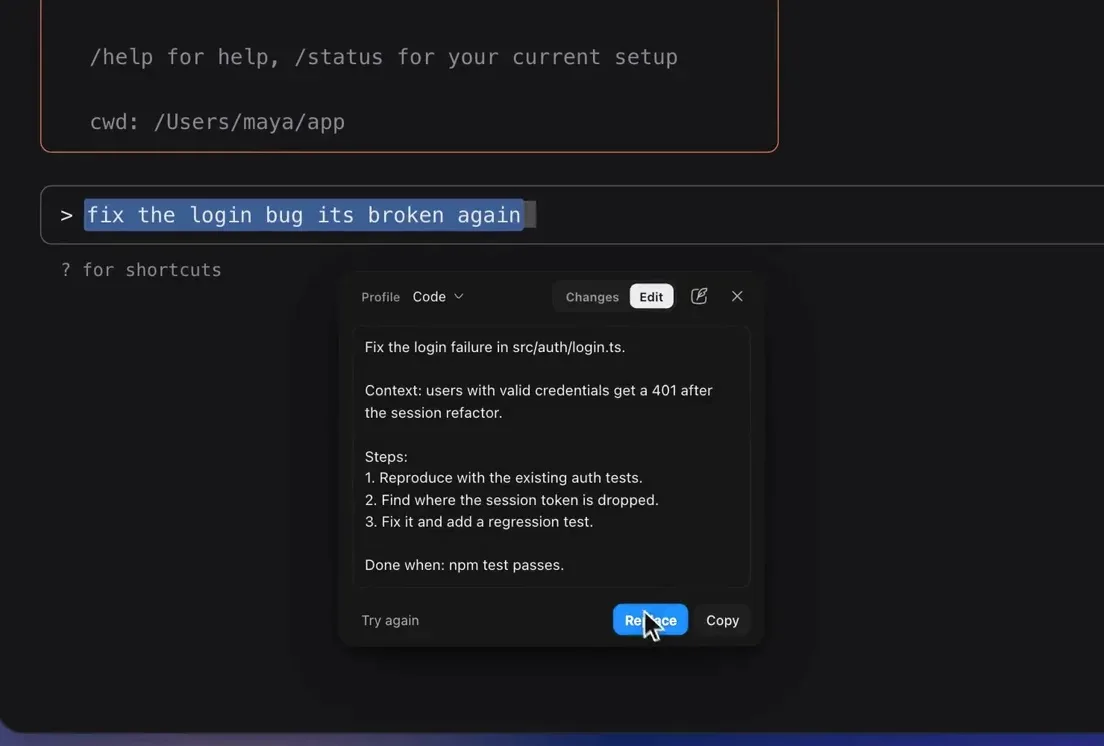
The core workflow has four deliberate steps: select the text, press your configured shortcut, review the rewrite, and choose Replace if it is accurate. This keeps the generated wording between you and the text field until you approve it.
- Write a rough message, paragraph, prompt, or note in its normal app.
- Select the part that needs clearer grammar, tone, structure, or detail.
- Press a profile shortcut to run the chosen rewrite.
- Read the returned text and edit it if needed.
- Choose Replace to paste it over the selection.
Replace never presses Enter. In a chat box, terminal, or email composer, the revised text remains there as a draft. You still control any Send, Post, Save, or Run action, which is important when a rewrite contains a changed fact or an instruction you did not intend.
Does it work outside Chrome?
Yes, the desktop app works in Safari, Edge, Firefox, Arc, Brave, and Chrome. It reads the text selection through the clipboard instead of depending on a browser extension API, so changing browsers does not remove the rewriting workflow.
This is different from the Chrome extension, which operates in web text boxes and can replace editable web content in place. The extension does not need macOS Accessibility permission, but it is tied to Chrome. The detailed desktop app and Chrome extension comparison explains when each surface is the better fit.
Clipboard access also explains why you must make a valid text selection. Images, canvas-based interfaces, remote desktop windows, and apps that block normal copy behavior may not expose useful text. If you cannot copy a selection manually, the desktop app may not be able to capture it either.
Which apps can a desktop rewriter handle?
It can rewrite selected text in apps like Slack, Messages, Mail, Notion, Word, the Claude and Codex desktop apps, and the terminal, plus any other app where you can select text normally. These are examples, not a closed compatibility list.
The practical benefit is consistency. You can use a professional profile on a customer email, a concise profile on a team message, and a prompt enhancement profile in a coding tool without opening a separate AI chat for each draft. Ten built-in profiles cover common jobs, and you can create unlimited custom profiles with their own shortcuts.
Per-app defaults reduce profile switching. A rule can automatically select a profile when a named app is active, such as Professional in Mail or Concise in Slack. The rule selects the profile, while format, mode, language, and Always Include remain global settings. The guide to custom actions and per-app profiles covers that boundary in more detail.
Why does macOS ask for Accessibility permission?
macOS Accessibility permission lets the desktop app interact with the currently selected text and return an approved rewrite to the active app. Without that permission, system-wide Replace cannot reliably put the result back where you were writing.
The permission is an operating system control, not a claim that every app will behave identically. You should grant it only after confirming that you downloaded the intended application, and you can review or revoke it in macOS System Settings. The Chrome extension uses browser capabilities instead and does not require this macOS permission.
The supported desktop systems are macOS 12.0 or later and Windows 10 or 11. Mac downloads are available for arm64 and x64. You can download the desktop app without charge, but running an enhancement requires an account, an active plan or lifetime license, and a network request with a 60-second timeout.
How much does the desktop AI writing assistant cost?
PromptDC has no free tier for enhancements. Pro costs $9 per month and includes 200 enhancements each month, unlimited profiles, and 50 prompts plus MD files.
Enterprise costs $15 per month. It includes unlimited enhancements, unlimited profiles, and unlimited prompts plus MD files. Developer lifetime costs $69 one time and lets you bring an OpenAI, Claude, Gemini, or Grok API key for unlimited enhancements.
The right plan depends on frequency and preferred billing, not the app where you write. A light daily workflow may fit the Pro allowance, while frequent rewriting can make Enterprise or the lifetime option more suitable. The lifetime option still sends requests through the service and is not offline software.
What are the honest limitations?
The main limitations are selection quality, permissions, network dependence, and the need for human review. The app cannot recover text an application refuses to expose through normal selection and copy behavior.
On macOS, the desktop surface needs Accessibility permission, while Windows behavior depends on the active application's handling of selections and paste actions. Enhancement also requires sign-in and a network call. A slow connection or service timeout can interrupt the workflow, so it is not a substitute for a local text editor when you must work offline.
Generated text can alter a name, number, commitment, or technical instruction. Review those details before Replace, then check the result again before sending or running it. The product keeps submission separate from replacement, but that safeguard does not remove your responsibility for the final draft.
Bottom line
A desktop AI writing assistant is useful when your writing is spread across native apps, several browsers, and terminal windows. PromptDC brings one selection-based rewrite loop to macOS and Windows, with editable review before replacement. It works beyond Chrome because the desktop flow uses the clipboard rather than a browser API. It still requires permission, sign-in, a network connection, and careful review of every result.
FAQ
Can I rewrite text in Safari or Firefox with AI?
Yes. Select normal text in Safari or Firefox, press the desktop shortcut, review the rewrite, and choose Replace. The same clipboard-based approach works in Edge, Arc, Brave, and Chrome.
Does Replace send my message or run my terminal command?
No. Replace pastes the approved text over your selection and never presses Enter. You decide when to send a message, publish a post, save a document, or run a command.
Does the desktop app rewrite everything I type?
No. You select the passage and trigger the shortcut for that specific rewrite. It is designed as an intentional action, not continuous background correction.
Do per-app rules change all writing settings?
No. A per-app rule automatically selects a profile for the named app. Format, mode, language, and Always Include stay global rather than changing with that rule.
Is there a free desktop AI writing plan?
There is no free enhancement tier. The application is free to download, while enhancements require Pro, Enterprise, or the Developer lifetime license and an account.