
Answer in 2 sentences
A per-site profile is a default rewrite style assigned to a specific website, so the right kind of help runs automatically wherever you are. With PromptDC you might set Grammar on Gmail and Social on LinkedIn, and never pick a mode manually again.
What is a writing profile?
A profile is a saved set of instructions for how PromptDC should rewrite your text. PromptDC ships with built-in writing profiles:
- Grammar: fix spelling, grammar, and punctuation
- Email: turn notes into a professional email
- Social: rewrite ideas into scroll-stopping posts
- Summarize: distil long text into key points
- Professional: polish casual text for work
- Reply, Concise, Explain, Image Prompt: and more
You can also create your own with custom instructions.
Why per-site defaults matter
Different sites call for different writing. On your email, you almost always want Grammar or Email. On LinkedIn, you want Social. Choosing the mode every time is friction. Per-site defaults remove it: PromptDC remembers the right profile for each website and applies it automatically.
How to set it up
- Open PromptDC and go to your profiles.
- Pick a profile and assign it as the default for a website (for example,
mail.google.com→ Email). - Repeat for the sites you use most.
- From then on, the right rewrite runs in one click on each site.
Where it works
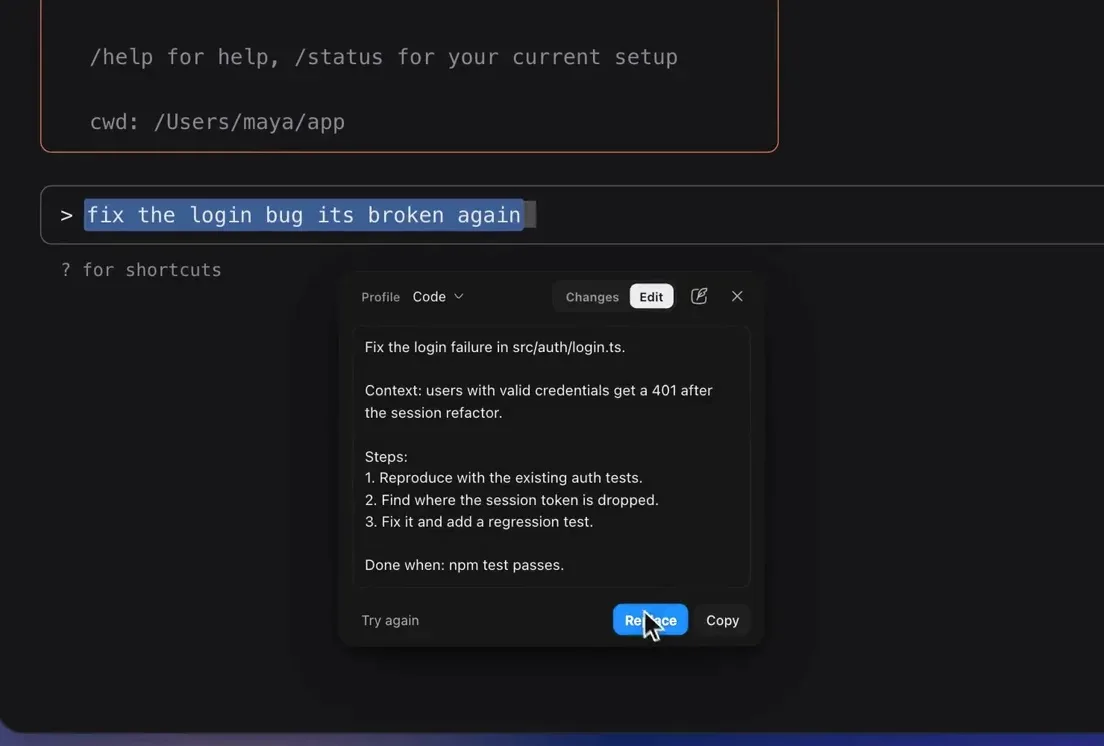
Through the Chrome extension, profiles rewrite editable web fields in place, including AI chats, while read-only text is copied. Per-site defaults apply to that browser workflow. PromptDC for Desktop carries the same profiles outside Chrome: select text in a compatible desktop chat area, editor, or terminal and use Cmd+Shift+E on macOS or Ctrl+Shift+E on Windows. Explore the writing assistant.
FAQ
Can I create custom profiles? Yes, alongside the built-in ones.
Do profiles sync? Your profiles and per-site defaults are saved to your account.
Does this work for coding too? Yes. The Code profile can rewrite a coding prompt in a browser build tool, editor AI chat, desktop chat app, or terminal. See PromptDC for coding.
CTA
Set up your profiles in the writing assistant.